
How do I add expense categories?
- Navigate to the section Accounting > Transactions > Money Out
- Click the gear icon
- Select ‘Business Categories’
- Click the ‘+Add’ sign
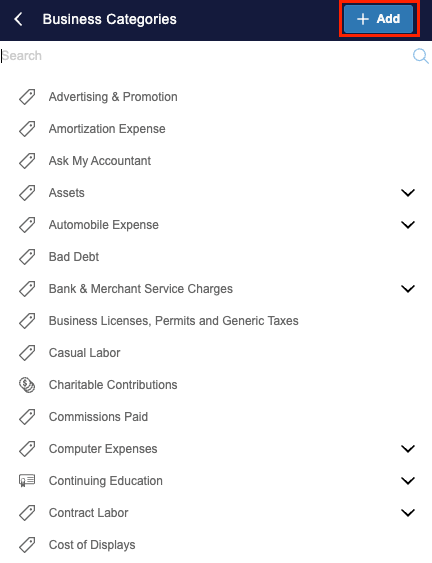
- Enter the name of your new expense category under ‘Category Name’ field
- If applicable, select the heading you’d like the expense to fall under in the ‘Parent Category’ field (this field is not required)
- Choose the Expense Account (i.e. GL account) that this category should map to
- Click ‘Save’
How do I delete expense categories?
- Navigate to the section Accounting > Transactions > Money Out
- Click the gear icon
- Select ‘Business Categories’
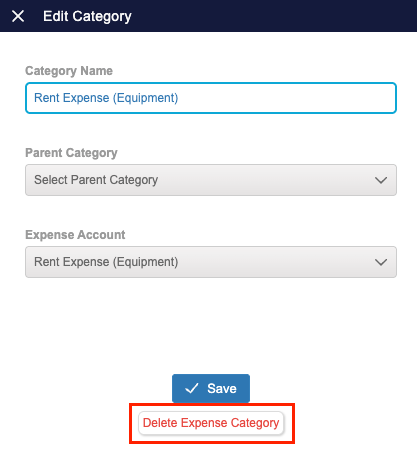
- Select the category that you wish to delete and click 'Delete Expense Category'
How do I restore expense categories?
- Navigate to the section Accounting > Transactions > Money Out
- Click the gear icon
- Select ‘Business Categories’
- Click the '+Add' sign
- In the Category Name field, enter the name of the category that you want to restore
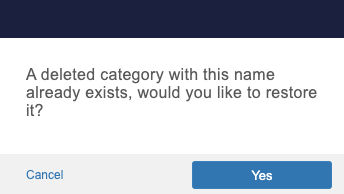
- You'll get a pop-up letting you know that there is already a category under this name and confirming if you'd like to restore it. Click 'Yes'.
- After restoring an expense category, you'll be able to tag expenses to it again