
Why do duplicate accounts appear in the Chart of Accounts/General Ledger/Balance Sheet?
If you create a Manually Tracked Account that corresponds to an account that is already linked, both will appear as separate accounts in your accounting. To avoid duplication and maintain consistency, these accounts should be merged. In addition, you can merge duplicate accounts for multiple accounts at once to prevent duplicate transactions.
How do I merge a Manually Tracked Account with a linked account?
Note: This process should only be completed after you've added all of the transactions being tracked through the Manually Tracked Account.
- Navigate to the Banks & Integrations screen
- Next to the linked bank account, hover over the Actions drop-down arrow
- Select ‘Merge Accounts’
- You can also click on the arrow next to a specific bank to find the Merge Accounts field
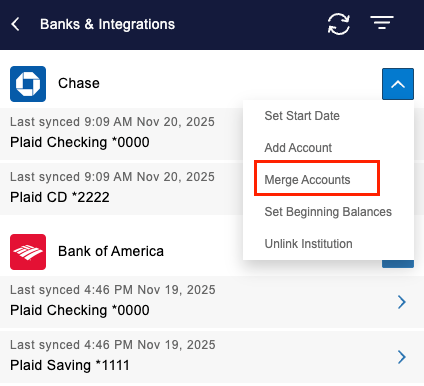
- You can also click on the arrow next to a specific bank to find the Merge Accounts field
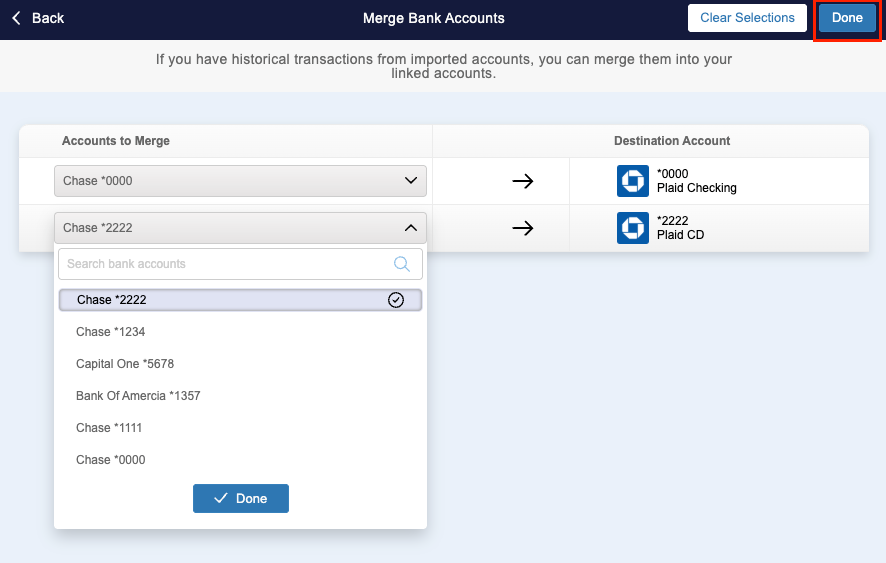
- Select the Manually Tracked Accounts that you wish to merge into a specific linked account (can do multiple at once)
- Click ‘Done
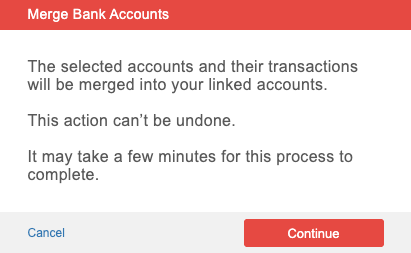
- A pop up will appear confirming that the selected account(s) should be merged. Click 'Continue' to finalize with the merge
Once merged:
- All transactions will appear under the linked account throughout your reports and dashboards
- The Manually Tracked Account will be archived automatically, with an option to restore it if needed