
Can I access older transactions?
Yes, you may be able to retrieve older transactions via a historic pull. How far back you can pull depends on your financial institution’s data-sharing policies, which can range from 90 days to over 2 years.
How do I perform a historic transaction pull?
- Navigate to the section Accounting > Transactions > Money In or Money Out
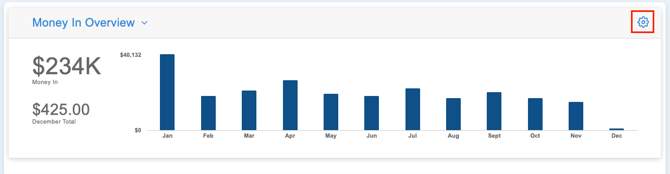
- Click the gear icon
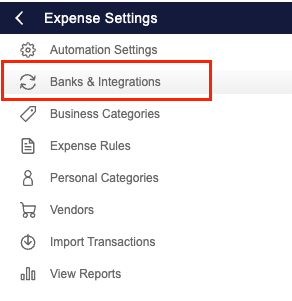
- Select ‘Banks & Integrations’
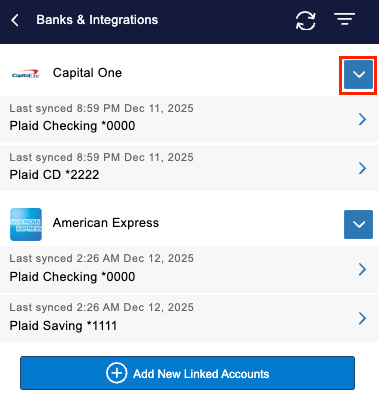
- Click the arrow next to a specific bank
- Or, to set the Start Date in bulk for all accounts for a specific institution, hover over the Actions arrow and select ‘Set Start Date’
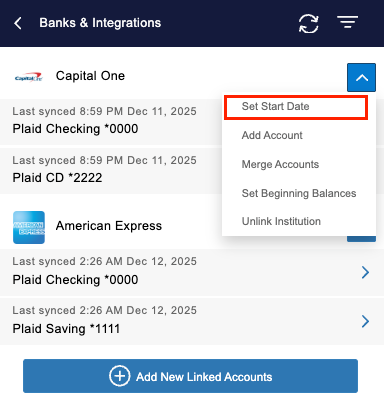
- Or, to set the Start Date in bulk for all accounts for a specific institution, hover over the Actions arrow and select ‘Set Start Date’
- Select the date you’d like to pull back to for the bank or specific account
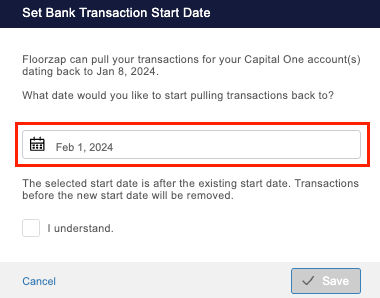
- Click ‘Save’
Are there any considerations to keep in mind when pulling historic transactions?
Yes, there are a couple considerations to keep in mind:
- If you’ve previously unlinked and relinked an account, you should not do a historic pull that overlaps with the period you've already tracked as this will create duplicates.
- Some institutions may limit how far back data can be pulled. When performing a historic pull, all available transactions will be pulled in. If needed, you can manually import older data via a CSV file or enter it manually.
Can I set Beginning Balances for linked bank accounts?
While you can set the Start Date for banks, you can also set the Beginning Balances for each individual linked account. To do so:
- Navigate to the Banks & Integrations screen
- Hover over the Actions drop-down arrow
- Select ‘Set Beginning Balances’
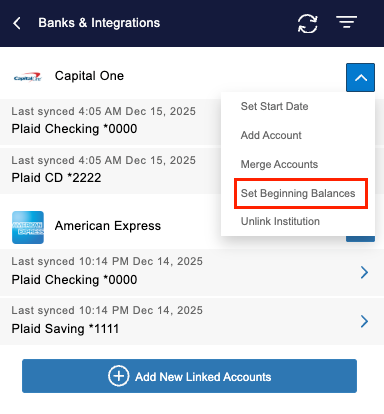
- Fill in the necessary details for each linked account
- Click ‘Done’
