- Navigate to the section Accounting > Transactions > Money In or Money Out
- Click the gear icon
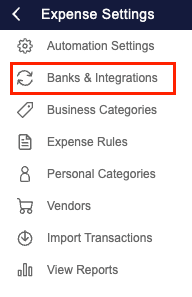
- Navigate to the Banks & Integrations screen
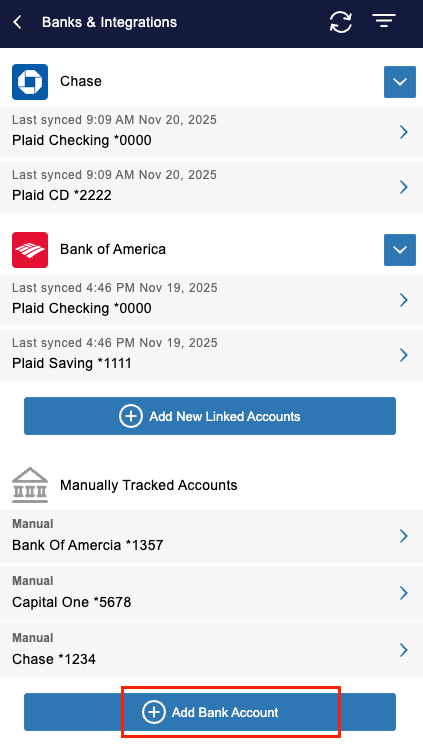
- Under ‘Manually Tracked Accounts’, click ‘+ Add Bank Account ’
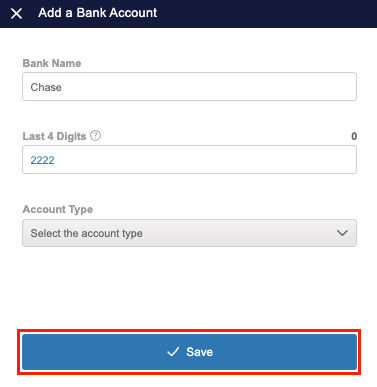
- Enter the Account Name and Mask (the last 4 digits of the account)
- Select the Account Type
- Business Bank Account
- Choose this option for dedicated business bank accounts
- Tracking an account as a ‘Business Bank Account’ will create an asset account in the Chart of Accounts and Balance Sheet
- b. Business Credit Card
- Choose this option for dedicated business credit cards
- Tracking an account as a ‘Business Credit Card’ will create a liability account in the Chart of Accounts and Balance Sheet
- Personal Bank Account
- Use this option to manually enter or import business transactions from a personal bank account
- Transactions associated with a 'Personal Bank Account' will be reflected in the Equity section of the Chart of Accounts and Balance Sheet
- Personal Credit Card
- Use this option to manually enter or import business transactions from a personal credit card
- Transactions associated with a 'Personal Credit Card' will be reflected in the Equity section of the Chart of Accounts and Balance Sheet
- Business Bank Account
- Click 'Save'