
Configuring Use Tax in Floorzap
Step 1: Open Tax Settings
Go to:
Settings > System Settings > Tax Defaults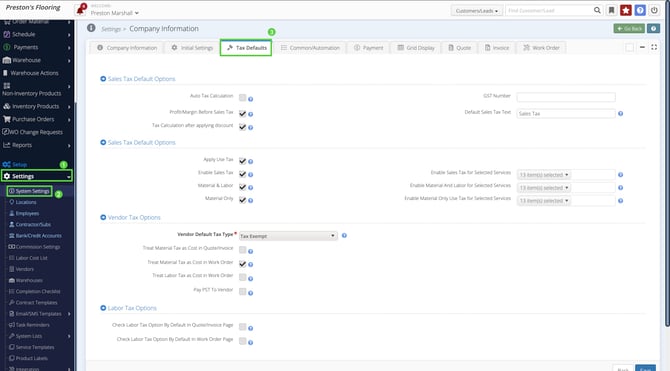
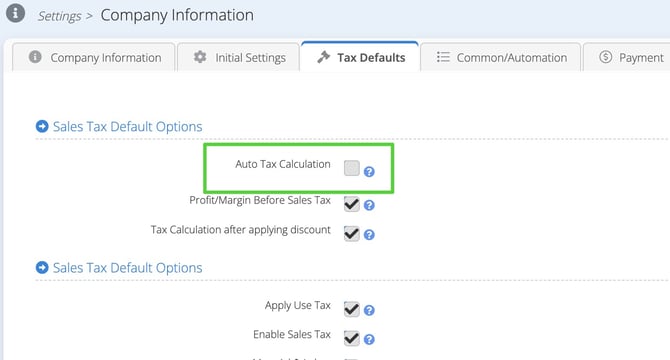
Auto Tax Calculation (Tax Rate Lookup)
The “Autotax Calculation” setting acts as a tax rate lookup using a service such as TaxJar.
When to turn it off
If your use tax should be calculated based on the store’s location, leave this setting unchecked.
When to turn it on
If your state requires tax to be calculated based on the customer’s location, check this setting to enable tax rate lookup.
Most users leave this off unless their state requires location based rates.
Enabling Use Tax
-
Locate Apply Use Tax
-
Check the box to enable it
In most states, enabling use tax will disable the primary sales tax option, since typically only one or the other applies.
Some states may require both in certain circumstances, but this is rare.
Defining When Use Tax Applies
Floorzap allows you to control which job types should calculate use tax.
Recommended Setting
Check Apply Use Tax on Material and Labor Jobs.
This matches how most states apply use tax.
Use tax is not applicable to labor only or cash and carry sales.
Sales Tax for Selected Services
Some states treat certain services differently. For example:
• Flooring may be use tax
• Cabinets or countertops may be sales tax
• Cash and carry is always sales tax
This section allows you to configure those rules.
You will see three configuration sections:
Enable Sales Tax for Selected Services
-
Typically, only Cash and Carry needs to be selected.
-
Any services your state specifically taxes (even if normally use tax) should also be selected here.
Material & Labor – Enable Material and Labor for Selected Services
-
Select all material and labor services not included in “Enable Sales Tax for Selected Services.”
-
These services will calculate Use Tax automatically.
Material Only Use Tax for Selected Services
-
Usually left blank.
-
Only configure if your state specifically requires use tax on material-only jobs.