
Yes. By default, any linked bank account or credit card is set to ‘Business Only’, meaning all its transactions are automatically tagged as business-related. If you’re using dedicated business accounts, which is recommended, no further action is needed.
However, if you’re using an account for both business and personal transactions, you can change the setting to ‘Mixed Use’. This will prompt you to manually tag each transaction as either business or personal.
What are the different account types?
- Business Only (default) - Transactions are automatically tagged as Business.
- Mixed Use - You’re prompted to tag each transaction as Business or Personal.
- Personal Only - Transactions are automatically tagged as Personal. This option is available, but not recommended, as Floorzap is designed to track business finances.
How do I set the account type?
- Navigate to the section Accounting > Transactions > Money In or Money Out
- Click the gear icon
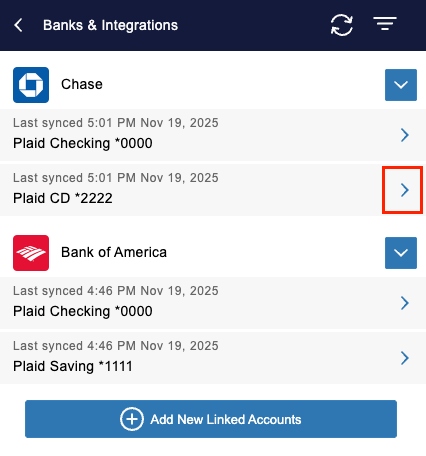
- Select ‘Banks & Integrations’
- Click the arrow next to the desired account
- Use the drop-down in the ‘Account Type’ field to select the account type
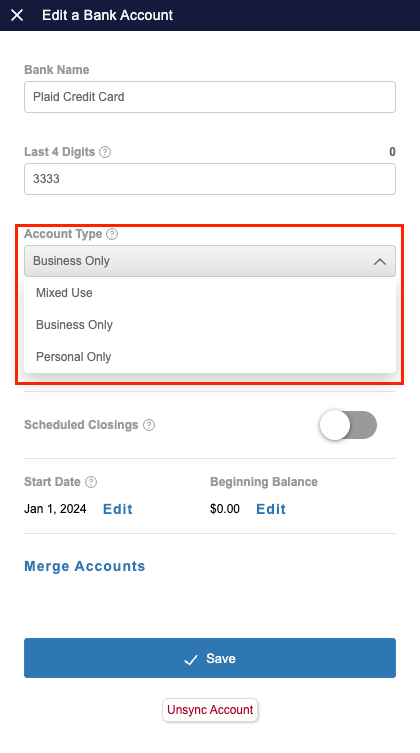
- Click the ‘Save’ button at the bottom